---
title: "Advanced fuel efficiency: customized flight data analytics.| OpenAirlines"
description: Unlock tailored flight analytics with SkyBreathe® Custom Flight Indicators. Dive deeper into fuel efficiency and optimize operations like never before.
image: https://blog.openairlines.com/hubfs/Blog-illustration/Custom%20Flight%20Inidcators.png
---
[](https://www.openairlines.com/)
- [Home](https://www.openairlines.com/)
- 360° eco-flying platform
- [SkyBreathe® Analytics – Fuel management software](https://www.openairlines.com/fuel-management-software/)
- [+ Emissions Report module](https://www.openairlines.com/fuel-management-software/report-co2-emissions/)
- [+ Advanced Trajectory module](https://www.openairlines.com/fuel-management-software/advanced-trajectory-module/)
- [SkyBreathe® MyFuelCoach – Pilot engagement app](https://www.openairlines.com/pilot-engagement-app/)
- [SkyBreathe® OnBoard – Real-time eco-flying app](https://www.openairlines.com/real-time-eco-flying-app/)
- [SkyBreathe® APM – Aircraft Performance Monitoring](https://www.openairlines.com/aircraft-performance-monitoring/)
- [SkyBreathe® OTP – On-time performance analysis](https://www.openairlines.com/on-time-performance-analysis/)
- Use Cases
- [SkyBreathe For CEO/CFO](https://www.openairlines.com/for-ceo-cfo/)
- [SkyBreathe For Head of Flights Ops & Chief Pilot](https://www.openairlines.com/for-head-of-flights-ops-chief-pilot/)
- [SkyBreathe For Pilots](https://www.openairlines.com/for-pilots/)
- [SkyBreathe For Fuel Managers & Ops Engineers](https://www.openairlines.com/for-fuel-managers-ops-engineers/)
- [Customers Stories](https://www.openairlines.com/customers/)
- Resources
- [Blog](https://blog.openairlines.com/)
- [White Papers](https://blog.openairlines.com/tag/white-paper)
- [Case Studies](https://blog.openairlines.com/tag/case-studies)
- [Webinars on fuel efficiency](https://blog.openairlines.com/tag/upcoming-webinars)
- [Upcoming Tradeshows](https://blog.openairlines.com/tag/tradeshow)
- [OpenAirlines Academy](https://academy.openairlines.com/?utm_campaign=23545222-Academy&utm_source=FuelEfficiencyBlog)
- Company
- [OpenAirlines Mission](https://www.openairlines.com/our-company/)
- [News](https://blog.openairlines.com/news)
- [Career - We are Hiring!](https://www.welcometothejungle.com/fr/companies/openairlines)
- [Sustainability Report](https://www.openairlines.com/sustainability-report/)
- [OpenDay](https://info.openairlines.com/openday2026)
- [Contact](https://www.openairlines.com/contact/)
[](https://cta-redirect.hubspot.com/cta/redirect/4233951/5390e83d-eea4-4183-83a3-0f26b0324d37)
##### Blog
- [Latest articles](https://blog.openairlines.com)
- [Fuel Efficiency](https://blog.openairlines.com/tag/fuel-efficiency)
- [Airline Experience](https://blog.openairlines.com/tag/airline-experience)
- [Sustainability](https://blog.openairlines.com/tag/environment)
- [Technology](https://blog.openairlines.com/tag/technology)
- [News](https://blog.openairlines.com/news)
[Back to Blog](https://blog.openairlines.com)
# Advanced fuel efficiency: what to do if standard metrics don't fit for your operations?
Published by [Louis](https://blog.openairlines.com/author/louis) on Jul 7, 2026, 4:29:31 PM
Every airline collects flight data. But not every airline operates the same way.
Your procedures, your fleet, your routes... they're yours. So why should your analysis be limited to the same metrics as everyone else?
Standard fuel efficiency metrics cover most common needs; they're your starting point and can be very useful all along your journey. But if your team wants to go deeper, to study a specific moment of the flight, a custom procedure, or a very precise operational pattern, you'll need the flexibility in your tools to do so.
## Analyze exactly what matters to your operations
When we talk about data analysis, we often want to go beyond what standard tools allow.
For example, as an airline analyst, you might want to:
- Study a specific segment of the flight unique to your operations.
- Track a procedure that no standard indicator captures.
- Validate a hypothesis your fuel team has been sitting on for months.
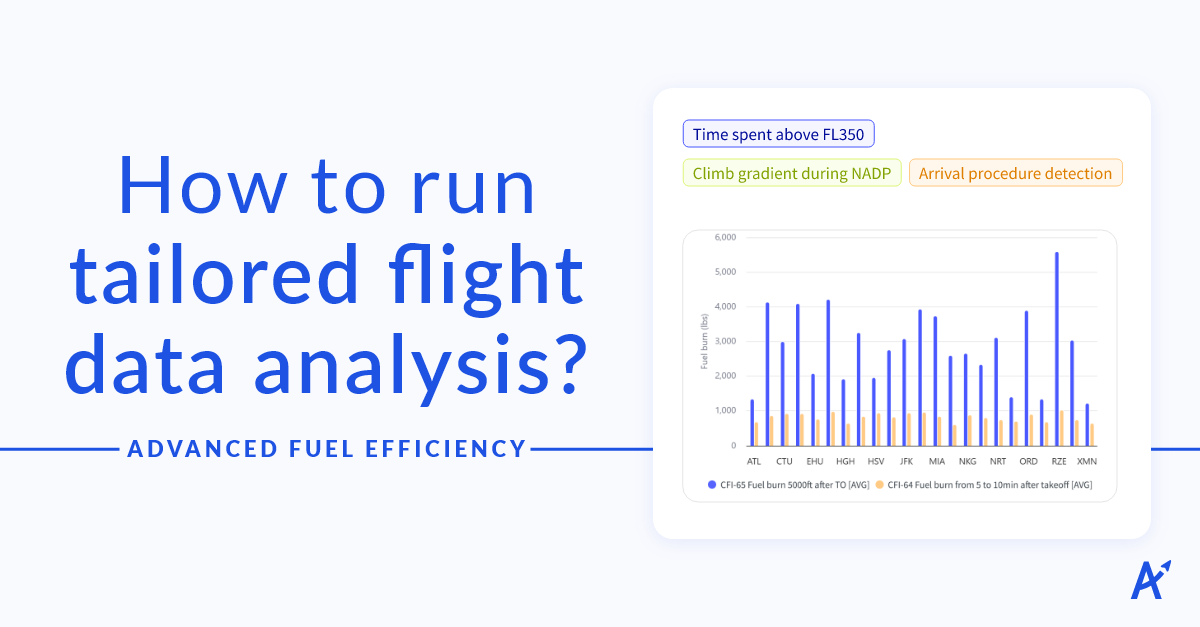
The good news is that with[Custom Flight Indicators](https://www.openairlines.com/fuel-management-software/custom-flight-indicators/), the new SkyBreathe® feature to go beyond standard metrics, you can now define, build, and run all the **tailored flight analytics** that matter to your operations.
In just a few clicks, you can isolate the flight events, build the metrics you need, and run the analysis across millions of flights. Your data is entirely yours to explore.
That means you could finally understand exactly w*hat happened on the first turn after liftoff?* Or *what are the altitude and fuel burn at 35 Nm after takeoff?*
Or even compare old vs. new STAR procedures, during any segment of the descent phase, just like Azul did. [\>\>\> Discover how Azul saved 1.5M liters of jet fuel by optimizing Charts & ATC at Viracopos airport](https://blog.openairlines.com/webinar-azul-saved-1.5m-liters-jet-fuel)
> "With Custom Flight Indicators, we could compare the old and new STAR procedures during any segment of the descent phase. This was especially useful when comparing 2 similar but different procedures, and it allowed us to validate the changes that we made."
>
> \- Juliana Paes dos Santos, Fuel Efficiency Coordinator at Azul
## 🔎 Turn flight data into unique insights for your airline
**SkyBreathe® Custom Flight Indicators allow you to create analyses that fit your specific operations and monitoring** needs. No developer skills. No advanced training. Just autonomy.
Custom Flight Indicators is built for fuel teams, not engineers. There's no code to write and no onboarding curve to climb: if you can describe the flight event you want to track, you can set it up yourself. Here's how it works:
### 4 easy steps to finally get that tailored fuel efficiency analysis you want
| **Define exactly what you're looking for.** Isolate any flight event: a moment, a phase, a condition. You set the parameters. | **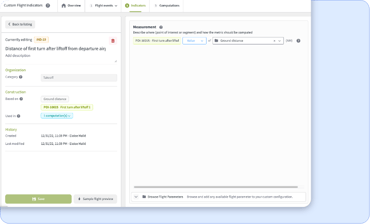** |
| --- | --- |
| **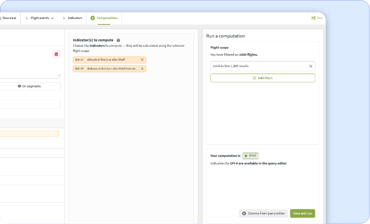** | **Build your own metrics.** Track fuel, time, altitude, speed, or any flight parameter available in your FDR data. Combine them in the way that makes sense for your operations. |
| **Run the analysis at scale.** Compute custom indicators across your entire flight history, millions of flights, if needed. | **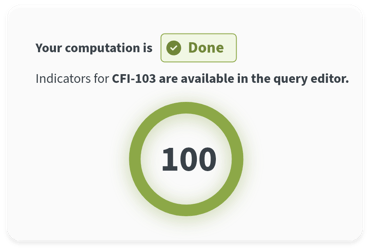** |
| **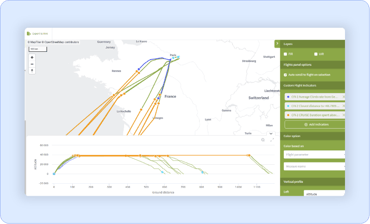** | **Visualize what you find.** See your results through charts and map-based views. Spot patterns. Confirm hypotheses. Share insights with your team. |
| **Use your metrics everywhere in [SkyBreathe®](https://www.openairlines.com/fuel-management-software/).** Feed the results directly into the Query Editor, Maps Dashboards, and other platform modules! | |
## 💡Customized flight data analysis: Uncover fuel savings you didn't know were there!
Beyond what you already know, customized flight analytics can guide your airline through a strategic shift in how you use flight data:
- **Drive efficiency & fuel savings.**
Tailored indicators mean you can dive deeper into the flight events that matter to your airline, spotting hotspots, and optimizing exactly what matters.
- **Support environmental goals.**
With precision segmentation, you’ll identify deviations, inefficiencies, and phase-by-phase performance gaps—all necessary to progress toward net-zero commitments.
- **Empower innovation without bottlenecks.**
Your operations, fuel, line-maintenance, and pilot teams can define, test, and iterate on new indicators on their own. No backlog, no coding queue, no waiting for developer resources.
With SkyBreathe® Custom Flight Indicators, your operational questions don’t have to wait.
Set the indicator, define the flight-scope, and drive the analysis faster than a coffee break!
**Your data. Your rules. Your insights.**
*Do you want to take a peek at the new Custom Flight Indicators module to see what the excitement is all about?
[Request a free consultation](https://info.openairlines.com/openairlines-request-a-free-consultation) with one of our fuel experts!*
---
| **About the author:** **** **Louis Meot,** SkyBreathe® Product Manager at OpenAirlines. With a background in aerospace engineering and a specialization in data science, Louis first applied his expertise in the airline industry at Air France before joining OpenAirlines' Science team in 2020. He has since transitioned to product management, bringing his technical depth and operational understanding to shape the analytics capabilities that help airlines optimize fuel efficiency and reduce emissions. |
| --- |
---
## FAQ
What if I need to analyze a new fuel-efficiency initiative at my airline that no standard metric covers?
That's exactly what [SkyBreathe® Custom Flight Indicators](https://www.openairlines.com/fuel-management-software/custom-flight-indicators/) is built for. You define the flight event, choose what to measure, and run the analysis across your entire flight history — no developer needed, no waiting. If your FDR captures it, you can build an indicator around it and get results in minutes.
What is Custom Flight Indicators in SkyBreathe® Analytics?
[Custom Flight Indicators](https://www.openairlines.com/fuel-management-software/custom-flight-indicators/) is a module within [SkyBreathe® Analytics](https://www.openairlines.com/fuel-management-software/). It lets fuel teams define, build and run their own flight analysis without coding skills.
You can isolate any flight event, choose what to measure at or between those moments, and compute results across millions of flights in minutes. Your custom indicators are then available directly across the SkyBreathe® platform.
How do other airlines use Custom Flight Indicators in practice?
Airlines today use Custom Flight Indicators in two main ways:
1. The first is to **run ad-hoc studies to support a specific decision.**
👉 Azul, for example, used it to [study approach procedures at Viracopos Airport (VCP).](https://blog.openairlines.com/webinar-azul-saved-1.5m-liters-jet-fuel)
2. The second is **recreating the custom flight segments and phases** they've relied on for years to communicate with pilots and management, this time within SkyBreathe® itself.
👉 Enabling Best Practices derived from Custom Flight Indicators to be delivered directly to pilots through [MyFuelCoach®.](https://www.openairlines.com/pilot-engagement-app/)
Tags: [Fuel efficiency](https://blog.openairlines.com/tag/fuel-efficiency), [Technology](https://blog.openairlines.com/tag/technology), [Fuel program](https://blog.openairlines.com/tag/fuel-program)
[Back to Blog](https://blog.openairlines.com)
[](http://www.facebook.com/share.php?u=https://blog.openairlines.com/advanced-fuel-efficiency-custom-flight-indicators&utm_medium=social&utm_source=facebook) [](https://twitter.com/intent/tweet?original_referer=https://blog.openairlines.com/advanced-fuel-efficiency-custom-flight-indicators&utm_medium=social&utm_source=twitter&url=https://blog.openairlines.com/advanced-fuel-efficiency-custom-flight-indicators&utm_medium=social&utm_source=twitter&source=tweetbutton&text=) [](http://www.instagram.com/share.php?u=https://blog.openairlines.com/advanced-fuel-efficiency-custom-flight-indicators&utm_medium=social&utm_source=instagram) [](http://www.linkedin.com/shareArticle?mini=true&url=https://blog.openairlines.com/advanced-fuel-efficiency-custom-flight-indicators&utm_medium=social&utm_source=linkedin) [](https://web.whatsapp.com)
## Related Articles
## [Boost flight performance and engage pilots!](https://blog.openairlines.com/boost-flight-efficiency-with-pilot-engagement)
Updated on Nov 20, 2024 Is there a better way to reduce carbon emissions than by calling on the...
[Read More](https://blog.openairlines.com/boost-flight-efficiency-with-pilot-engagement)
## [5 ways to reduce fuel burn using aircraft connectivity.](https://blog.openairlines.com/5-ways-to-reduce-fuel-burn-with-aircraft-connectivity)
In today's fast-changing aviation landscape, airlines grapple with rising fuel costs and the urgent...
[Read More](https://blog.openairlines.com/5-ways-to-reduce-fuel-burn-with-aircraft-connectivity)
## [Building the Business Case for AID & In-flight Connectivity](https://blog.openairlines.com/how-to-build-the-business-case-for-aid-and-in-flight-connectivity)
The aviation industry faces soaring fuel prices and the pressing call to swiftly decarbonize their...
[Read More](https://blog.openairlines.com/how-to-build-the-business-case-for-aid-and-in-flight-connectivity)
[](https://www.openairlines.com/)
EUROPE - HEADQUARTERS
31, rue Alsace Lorraine – 31000 Toulouse, France
ASIA
10 Floor, Guangdong Investement Tower
148 Connaught Road Central, Hong Kong
AMERICAS
c/o Jade Fiducial 990 Biscayne Blvd Office
701 Miami, FL33132 USA
- SkyBreathe® Platform
- [SkyBreathe® Analytics – Fuel management software](https://www.openairlines.com/fuel-management-software/)
- [SkyBreathe® MyFuelCoach – Pilot engagement app](https://www.openairlines.com/pilot-engagement-app/)
- [SkyBreathe® OnBoard – Real-time eco-flying app](https://www.openairlines.com/real-time-eco-flying-app/)
- [SkyBreathe® APM – Aircraft Performance Monitoring](https://www.openairlines.com/aircraft-performance-monitoring/)
- [SkyBreathe® OTP – On-time performance analysis](https://www.openairlines.com/on-time-performance-analysis/)
- Use Cases
- [SkyBreathe® For CEO/CFO](https://www.openairlines.com/for-ceo-cfo/)
- [SkyBreathe® For Head of Flights Ops & Chief Pilot](https://www.openairlines.com/for-head-of-flights-ops-chief-pilot/)
- [For Fuel Managers & Operations Engineers](https://www.openairlines.com/for-fuel-managers-ops-engineers/)
- [SkyBreathe® For Pilots](https://www.openairlines.com/for-pilots/)
- [Customers Stories](https://www.openairlines.com/customers/)
- [Our Company](https://www.openairlines.com/our-company/)
- [Sustainability Report](https://www.openairlines.com/sustainability-report/)
- [Career](https://www.welcometothejungle.com/fr/companies/openairlines)
- [Contact](https://www.openairlines.com/contact/)
- Resources
- [Blog](https://blog.openairlines.com/)
- [White papers](https://blog.openairlines.com/tag/white-paper)
- [Case Studies](https://blog.openairlines.com/tag/case-studies)
- EVENTS
- [OpenDay](https://info.openairlines.com/openday)
- [Upcoming Webinars](https://blog.openairlines.com/tag/upcoming-webinars)
- [Upcoming Trade Shows](https://blog.openairlines.com/tag/tradeshow)
### © Openairlines 2023 - All Rights Reserved
- [Privacy Policy](https://www.openairlines.com/privacy-policy/)
- [Cookies Policy](https://www.openairlines.com/cookies-policy/)
- [Site Map](https://www.openairlines.com/site-map/)
```json
{
"@context" : "https://schema.org",
"@type" : "BlogPosting",
"author" : {
"@type" : "Person",
"name" : "Louis",
"url" : "https://blog.openairlines.com/author/louis"
},
"dateModified" : "2026-07-07T14:29:31.050Z",
"datePublished" : "2026-07-07T14:29:31.000Z",
"headline" : "Advanced fuel efficiency: customized flight data analytics.",
"image" : [ "https://blog.openairlines.com/hubfs/Blog-illustration/Custom%20Flight%20Inidcators.png" ],
"mainEntityOfPage" : {
"@id" : "https://blog.openairlines.com/advanced-fuel-efficiency-custom-flight-indicators",
"@type" : "WebPage"
},
"publisher" : {
"@type" : "Organization",
"logo" : {
"@type" : "ImageObject",
"url" : "https://blog.openairlines.com/hubfs/Blog-illustration/Logo.png"
},
"name" : "Nextops OpenAirlines"
}
}
```